Allegro is an online marketplace, and its seller help site has three pages that decide what a clothing listing's images look like: the general thumbnail rules, the gallery rules, and a separate page for the Fashion category. This page collects what those pages say, with the date we checked them, and turns it into a shot list for clothing. We make NotShot, an AI on-model photo tool, so we also cover where on-model images fit.
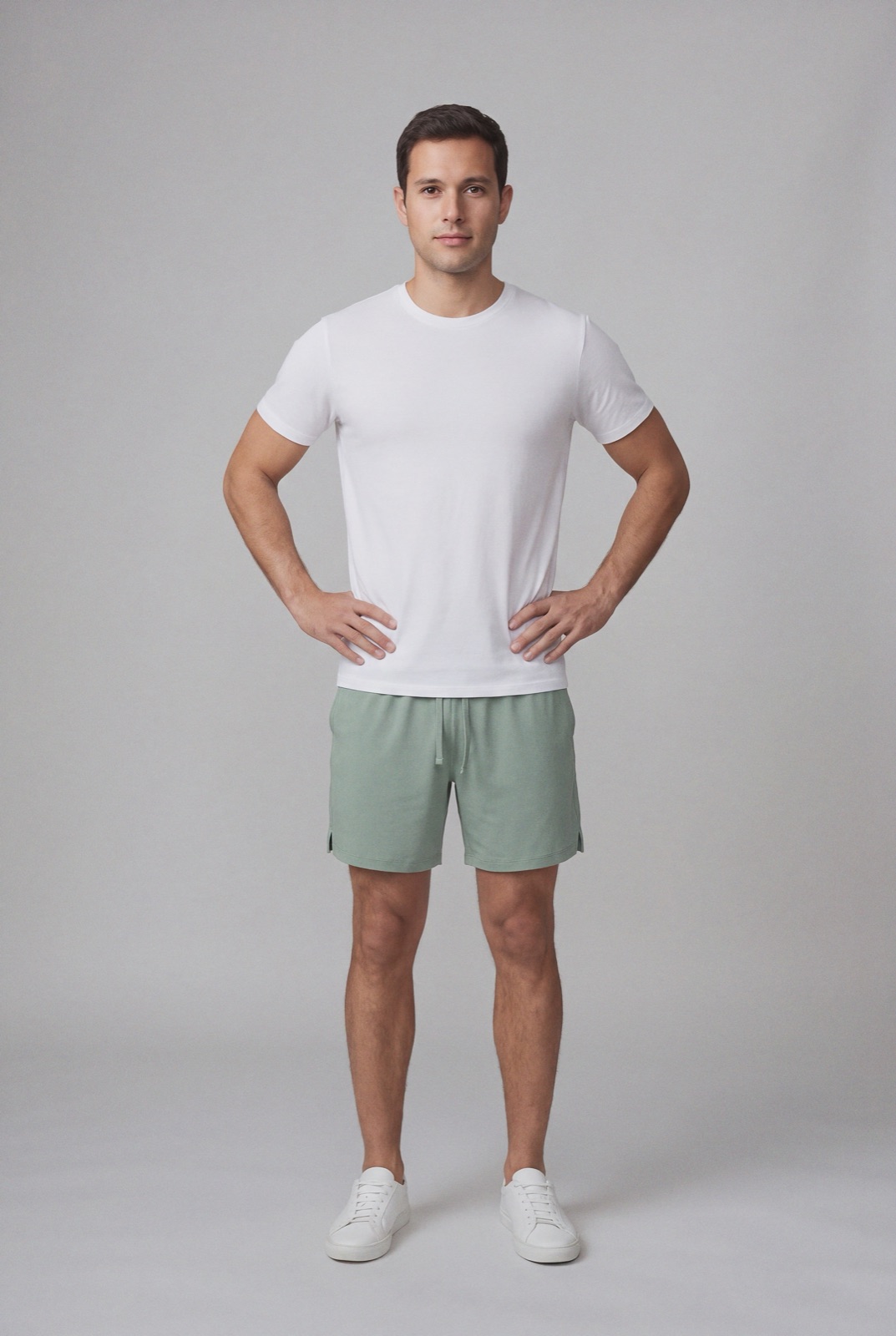
An on-model render made with NotShot: front angle, whole outfit in frame, shown once. We measured this gray backdrop at a V value of about 0.6 to 0.7, below Allegro's 0.8 threshold, so for an Allegro thumbnail it would need a white or lighter gray background.
Thumbnail size and format
Allegro's page What a thumbnail is and how to set it according to our rules (checked by us on 1 November 2026) says the thumbnail is the first image you add in the listing form. The rules apply to regular and business accounts, and sellers with individual agreements covering thumbnail specifications are exempt.
Upload: up to 26 Mpx.
Display: up to 2560×2560 pixels. Larger images are scaled down proportionally.
Minimum: the longer side must be at least 400 pixels.
Thumbnail background for clothing
The standard thumbnail background on Allegro is white, 255.255.255 in RGB, and white or transparent products are not an exception. For clothing there is a second option. In Fashion (Clothing, Footwear, Accessories), Kids clothing and footwear, and some Sports and Travel categories, the thumbnail must have a uniform white background or a uniform light gray background, with a V value in the HSV model not lower than 0.8 on a scale from 0 to 1 (checked 1 November 2026).
A V value of 0.8 means the brightest color channel of the background is at least 0.8 of full brightness, about 204 on a 0 to 255 scale. Studio grays can be darker than that, like the backdrop in the render above, so check the background pixels before you upload.
What the thumbnail must not show
From the same thumbnail page:
No logos: no logotype of the product or of your store. The exception is designer products where the logo is visible on the product or its packaging.
No extras: no additional graphic elements such as text, icons, units of measurement, borders or watermarks.
Lifestyle only in select cases: showing a product in the context of its use is allowed only in specific cases, such as used items on a regular account and auction listings in certain categories. Check the category list on that page.
Models and the Product Catalog
Allegro says models can appear in the photo with the product in any category. But if its mechanism recognizes a face in an image, it hides the image from the Allegro Product Catalog and the product change request form (checked 1 November 2026). Your offer can still use an on-model image, but if you also want an image to show in the Catalog, add a shot without a visible face, such as a packshot.
On a model: show the product on a model, and the product and model only once.
Front angle: use a front angle, not the product on a model from different angles.
Framing: the model or product should take up around 80 percent of the photo height or width.
Whole product: present the whole product without cropping it, clearly visible, and don't zoom in on details.
No text: no graphics or captions, and no text in the background.
Other product types differ. For underwear, Allegro allows a model or, for multipacks, a packshot, with a front angle and no other angles. For footwear, it asks for a single shoe from the side with the toe pointing right, no model, on white or one of its gray and beige tones, at least 360 pixels. Jewelry, watches, purses and wallets, luggage, backpacks, belts, sunglasses and headwear go in a packshot on white, not on a model.
The Fashion page also asks for a detailed, honest description with size, material, fit and purpose, complete product parameters, and a size chart where the category offers one.
Minimum: the longer side must be at least 500 pixels. Uploads up to 26 Mpx, displayed up to 2560×2560.
Proportions: any, such as 1:1, 4:3 or 16:9.
Formats: JPG, JPEG or PNG, plus WEBP when you list through the API or from a file. Use the sRGB profile for full color fidelity.
How many: 10 images on a regular account, and 16 on a business account in all categories except classifieds, where the limit is 40.
Background: any background color.
Not allowed: text or your store's logo.
Allowed: brand logos, color and pattern markings, and close ups.
Allegro also says sorting by relevance takes the thumbnail rules into account, and that thumbnails that don't meet its standards can lead to sanctions on your account.
Allegro image checklist for clothing
Thumbnail: the garment on a model, shown once, front angle, whole product in frame, filling around 80 percent of the height or width.
Background: uniform white, or uniform light gray with a V value of at least 0.8.
Clean: no store logo, text, icons, borders or watermarks.
Catalog: add a shot without a visible face if you want an image in the Product Catalog.
Gallery: back, side and fabric and label close ups, any background, longer side at least 500 pixels, sRGB.
Count: up to 10 images on a regular account, 16 on a business account.
Allegro's Fashion rules ask for women and men clothing thumbnails on a model, from the front, on white or light gray, which is the image NotShot is built to make. NotShot renders your garment on your own model from the product photo you already have. Every render is checked by an AI judge that compares it with your upload for color, print and cut. Renders below the quality bar are refunded automatically, so you pay for photos that pass the check, not for attempts. Check the background against the 0.8 threshold before you upload, and keep your packshot for the Product Catalog. Plans are on the pricing page.
Questions we get asked
What background does Allegro require for clothing thumbnails?
Allegro says thumbnails in Fashion (Clothing, Footwear, Accessories), Kids clothing and footwear, and some Sports and Travel categories must have a uniform white background or a uniform light gray background with an HSV V value not lower than 0.8 on a 0 to 1 scale. Checked on Allegro Help for sellers on 1 November 2026.
Should a clothing thumbnail on Allegro show a model?
For women and men clothing, Allegro's Fashion rules say to show the product on a model, once, from the front, with the model or product taking up around 80 percent of the photo height or width, without cropping the product.
What size should Allegro images be?
Allegro accepts uploads up to 26 Mpx and displays images up to 2560×2560 pixels. The longer side must be at least 400 pixels for the thumbnail and at least 500 pixels for gallery images.
How many images can I add to an Allegro listing?
Allegro says a regular account can add 10 images and a business account 16 images in all categories except classifieds, where the limit is 40.
Why is my on-model image missing from the Allegro Product Catalog?
Allegro says that if its mechanism recognizes a face in an image, it hides that image from the Product Catalog and the product change request form. Models can still appear with the product in your offer.
NotShot is a Berlin-based tool for on-model product photography without the photoshoot. Try NotShot